---
title: How To Navigate Between Projects and Groups
description: Projects dashboards groups switching overview adding queries query
---
[Skip to content](https://processes.premiercrop.com/knowledge/how-to-navigate-between-projects-and-groups#main-content)
[Customer portal](https://processes.premiercrop.com/tickets-view?hsLang=en)
![PCS-Black-icon-1.png\]](https://processes.premiercrop.com/hs-fs/hubfs/PCS-Black-icon-1.png?width=35&height=40&name=PCS-Black-icon-1.png)
- [Tickets](https://processes.premiercrop.com/tickets-view)
- [Sign out](https://processes.premiercrop.com/_hcms/mem/logout)
Open main navigation
Close main navigation
- [Tickets](https://processes.premiercrop.com/tickets-view)
- [Sign out](https://processes.premiercrop.com/_hcms/mem/logout)
- [Customer portal](https://processes.premiercrop.com/tickets-view)
- [Go to premiercrop.com](https://services.premiercrop.com/)
[Go to premiercrop.com](https://services.premiercrop.com/)
What do you need help with today?
- There are no suggestions because the search field is empty.
1. [Premier Knowledge Base](https://processes.premiercrop.com/knowledge?hsLang=en)
2. [Analyst Studio](https://processes.premiercrop.com/knowledge/analyst-studio?hsLang=en)
3. [Getting Started](https://processes.premiercrop.com/knowledge/analyst-studio?hsLang=en#getting-started)
# How To Navigate Between Projects and Groups
## Once in a Project (also referred to as a dashboard), you can easily switch to a new Group's data, or switch to a new Project.
1. Clicking into the dropdown menu in the top left Project Name will allow you switch to a different Project.
2. Clicking into the dropdown menu and choosing a different Group will allow you to view the same project you are in, run against a different Group.
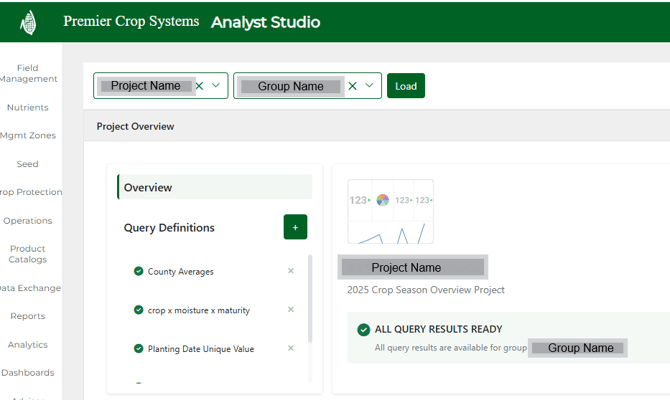
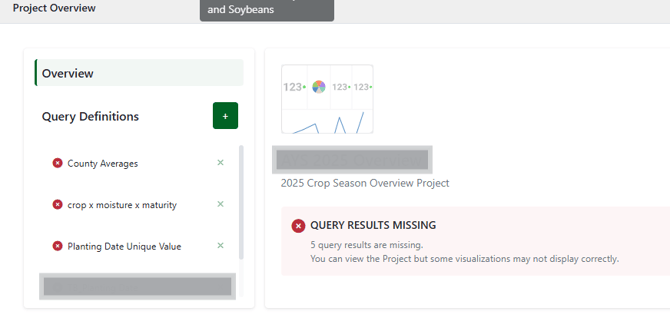
> Changing the Group may cause a few hiccups if some of the Queries used in the Project’s visualizations haven’t been run for that Group yet. If that happens, just open Manage Queries, run the Query Definition for that Group, and then refresh your Project page after the query finishes.
An example of the view when you choose a group that is not listed on the 'Ready to Use' group list, but rather listed on the 'Other' group list.
- [Getting Started with Premier Crop](https://processes.premiercrop.com/knowledge/getting-started-with-premier-crop?hsLang=en#main-content)
- [Advisor Excel-erator](https://processes.premiercrop.com/knowledge/getting-started-with-premier-crop?hsLang=en#advisor-excel-erator)
- [Premier Crop Systems Software Training](https://processes.premiercrop.com/knowledge/premier-crop-systems-software-training?hsLang=en#main-content)
- [Field Management](https://processes.premiercrop.com/knowledge/premier-crop-systems-software-training?hsLang=en#field-management)
- [Nutrients](https://processes.premiercrop.com/knowledge/premier-crop-systems-software-training?hsLang=en#nutrients)
- [Mgmt Zones](https://processes.premiercrop.com/knowledge/premier-crop-systems-software-training?hsLang=en#mgmt-zones)
- [Seed](https://processes.premiercrop.com/knowledge/premier-crop-systems-software-training?hsLang=en#seed)
- [Crop Protection](https://processes.premiercrop.com/knowledge/premier-crop-systems-software-training?hsLang=en#crop-protection)
- [Operations](https://processes.premiercrop.com/knowledge/premier-crop-systems-software-training?hsLang=en#operations)
- [Premier Intelligence](https://processes.premiercrop.com/knowledge/premier-crop-systems-software-training?hsLang=en#premier-intelligence)
- [Data Exchange](https://processes.premiercrop.com/knowledge/premier-crop-systems-software-training?hsLang=en#data-exchange)
- [Reports](https://processes.premiercrop.com/knowledge/premier-crop-systems-software-training?hsLang=en#reports)
- [Analytics](https://processes.premiercrop.com/knowledge/premier-crop-systems-software-training?hsLang=en#analytics)
- [Dashboards](https://processes.premiercrop.com/knowledge/premier-crop-systems-software-training?hsLang=en#dashboards)
- [Webinars](https://processes.premiercrop.com/knowledge/premier-crop-systems-software-training?hsLang=en#webinars)
- [System Information](https://processes.premiercrop.com/knowledge/premier-crop-systems-software-training?hsLang=en#system-information)
- [Tips and Tricks](https://processes.premiercrop.com/knowledge/premier-crop-systems-software-training?hsLang=en#tips-and-tricks)
- [Unpublished Videos](https://processes.premiercrop.com/knowledge/premier-crop-systems-software-training?hsLang=en#unpublished-videos)
- [Release Note](https://processes.premiercrop.com/knowledge/premier-crop-systems-software-training?hsLang=en#release-note)
- [Analyst Studio](https://processes.premiercrop.com/knowledge/analyst-studio?hsLang=en#main-content)
- [Getting Started](https://processes.premiercrop.com/knowledge/analyst-studio?hsLang=en#getting-started)
- [Visualizations](https://processes.premiercrop.com/knowledge/analyst-studio?hsLang=en#visualizations)
- [Filters](https://processes.premiercrop.com/knowledge/analyst-studio?hsLang=en#filters)
- [Calculated Fields](https://processes.premiercrop.com/knowledge/analyst-studio?hsLang=en#calculated-fields)
- [Exporting](https://processes.premiercrop.com/knowledge/analyst-studio?hsLang=en#exporting)
- [Hardware & Software](https://processes.premiercrop.com/knowledge/hardware-software?hsLang=en#main-content)
- [Ag Leader](https://processes.premiercrop.com/knowledge/hardware-software?hsLang=en#ag-leader)
- [Case IH](https://processes.premiercrop.com/knowledge/hardware-software?hsLang=en#case-ih)
- [John Deere](https://processes.premiercrop.com/knowledge/hardware-software?hsLang=en#john-deere)
- [Kinze](https://processes.premiercrop.com/knowledge/hardware-software?hsLang=en#kinze)
- [Precision Planting](https://processes.premiercrop.com/knowledge/hardware-software?hsLang=en#precision-planting)
- [Raven](https://processes.premiercrop.com/knowledge/hardware-software?hsLang=en#raven)
- [SMS](https://processes.premiercrop.com/knowledge/hardware-software?hsLang=en#sms)
- [Trimble](https://processes.premiercrop.com/knowledge/hardware-software?hsLang=en#trimble)
- [Sales](https://processes.premiercrop.com/knowledge/sales?hsLang=en#main-content)
- [Sales Resources](https://processes.premiercrop.com/knowledge/sales?hsLang=en#sales-resources)
- [Partner](https://processes.premiercrop.com/knowledge/sales?hsLang=en#partner)
[](https://4362973.hs-sites.com/knowledge?hsLang=en)
Premier Processes
Copyright © 2026, Powered by Premier Crop Systems