---
title: How to Set Query Rate Columns for Nutrients
description: After assigning nutrient applications "As Actual", you will need to assign a query rate column for each application.
---
[Skip to content](https://processes.premiercrop.com/knowledge/how-to-set-query-rate-columns-for-nutrients#main-content)
[Customer portal](https://processes.premiercrop.com/tickets-view?hsLang=en)
![PCS-Black-icon-1.png\]](https://processes.premiercrop.com/hs-fs/hubfs/PCS-Black-icon-1.png?width=35&height=40&name=PCS-Black-icon-1.png)
- [Tickets](https://processes.premiercrop.com/tickets-view)
- [Sign out](https://processes.premiercrop.com/_hcms/mem/logout)
Open main navigation
Close main navigation
- [Tickets](https://processes.premiercrop.com/tickets-view)
- [Sign out](https://processes.premiercrop.com/_hcms/mem/logout)
- [Customer portal](https://processes.premiercrop.com/tickets-view)
- [Go to premiercrop.com](https://services.premiercrop.com/)
[Go to premiercrop.com](https://services.premiercrop.com/)
What do you need help with today?
- There are no suggestions because the search field is empty.
1. [Premier Knowledge Base](https://processes.premiercrop.com/knowledge?hsLang=en)
2. [Premier Crop Systems Software Training](https://processes.premiercrop.com/knowledge/premier-crop-systems-software-training?hsLang=en)
3. [Nutrients](https://processes.premiercrop.com/knowledge/premier-crop-systems-software-training?hsLang=en#nutrients)
# How to Set Query Rate Columns for Nutrients
## After assigning nutrient applications "As Actual", you will need to assign a query rate column for each application.
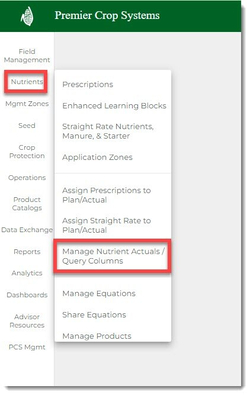
1. After assigning nutrient applications "As Actual", click on the **Nutrient** tab, then click the "Manage Nutrient Actuals/Query Columns" option.
2. Navigate to the desired Grower *(Farm and Field if you want to drill down)* and Year, then click the "Load" button.
3. This page combines ALL of the nutrient applications in **ONE** place:
1. Variable Rate from the Prescription Page
2. Straight Rate
3. Manure
4. Starter
5. Any as-applied files that have been uploaded
4. You will see how many applications (VR, Straight Rate, Starter, and Manure) still need to have a Nutrient Query Column assigned to them. *Note: These applications WILL NOT be appear in Reports, Queries, and Dashboards until they have a **Query Column** set.*
5. You can set these individually by using the dropdown for each application.
6. Or use your filters, select the fields, then select the **"Nutrient Type" and "Query Column"** from the batch button at the top of the page, and click the "Assign" button.
7. Remove any filters by clicking the "x".
8. You will now see how many applications still need **Query Columns** set for them.
9. Continue to use your filters for assigning query columns quickly and efficiently.
10. If you need to adjust any application at a field level, click the **EDIT** button.
11. Make any changes and then click the green check to save.
12. If you need to [set Nutrient Method and/or Timing](https://processes.premiercrop.com/knowledge/how-to-assign-nutrient-application-method-and-timing-in-the-manage-nutrient-actuals-page-video?hsLang=en), you can do that now.
13. If you have any questions, contact your advisor support representative.
Tips for efficiently assigning Nutrient Query Columns:
1. Use your filters
2. Use the column sorting functionality.
- [Getting Started with Premier Crop](https://processes.premiercrop.com/knowledge/getting-started-with-premier-crop?hsLang=en#main-content)
- [Advisor Excel-erator](https://processes.premiercrop.com/knowledge/getting-started-with-premier-crop?hsLang=en#advisor-excel-erator)
- [Premier Crop Systems Software Training](https://processes.premiercrop.com/knowledge/premier-crop-systems-software-training?hsLang=en#main-content)
- [Field Management](https://processes.premiercrop.com/knowledge/premier-crop-systems-software-training?hsLang=en#field-management)
- [Nutrients](https://processes.premiercrop.com/knowledge/premier-crop-systems-software-training?hsLang=en#nutrients)
- [Mgmt Zones](https://processes.premiercrop.com/knowledge/premier-crop-systems-software-training?hsLang=en#mgmt-zones)
- [Seed](https://processes.premiercrop.com/knowledge/premier-crop-systems-software-training?hsLang=en#seed)
- [Crop Protection](https://processes.premiercrop.com/knowledge/premier-crop-systems-software-training?hsLang=en#crop-protection)
- [Operations](https://processes.premiercrop.com/knowledge/premier-crop-systems-software-training?hsLang=en#operations)
- [Premier Intelligence](https://processes.premiercrop.com/knowledge/premier-crop-systems-software-training?hsLang=en#premier-intelligence)
- [Data Exchange](https://processes.premiercrop.com/knowledge/premier-crop-systems-software-training?hsLang=en#data-exchange)
- [Reports](https://processes.premiercrop.com/knowledge/premier-crop-systems-software-training?hsLang=en#reports)
- [Analytics](https://processes.premiercrop.com/knowledge/premier-crop-systems-software-training?hsLang=en#analytics)
- [Dashboards](https://processes.premiercrop.com/knowledge/premier-crop-systems-software-training?hsLang=en#dashboards)
- [Webinars](https://processes.premiercrop.com/knowledge/premier-crop-systems-software-training?hsLang=en#webinars)
- [System Information](https://processes.premiercrop.com/knowledge/premier-crop-systems-software-training?hsLang=en#system-information)
- [Tips and Tricks](https://processes.premiercrop.com/knowledge/premier-crop-systems-software-training?hsLang=en#tips-and-tricks)
- [Unpublished Videos](https://processes.premiercrop.com/knowledge/premier-crop-systems-software-training?hsLang=en#unpublished-videos)
- [Release Note](https://processes.premiercrop.com/knowledge/premier-crop-systems-software-training?hsLang=en#release-note)
- [Analyst Studio](https://processes.premiercrop.com/knowledge/analyst-studio?hsLang=en#main-content)
- [Getting Started](https://processes.premiercrop.com/knowledge/analyst-studio?hsLang=en#getting-started)
- [Visualizations](https://processes.premiercrop.com/knowledge/analyst-studio?hsLang=en#visualizations)
- [Filters](https://processes.premiercrop.com/knowledge/analyst-studio?hsLang=en#filters)
- [Calculated Fields](https://processes.premiercrop.com/knowledge/analyst-studio?hsLang=en#calculated-fields)
- [Exporting](https://processes.premiercrop.com/knowledge/analyst-studio?hsLang=en#exporting)
- [Hardware & Software](https://processes.premiercrop.com/knowledge/hardware-software?hsLang=en#main-content)
- [Ag Leader](https://processes.premiercrop.com/knowledge/hardware-software?hsLang=en#ag-leader)
- [Case IH](https://processes.premiercrop.com/knowledge/hardware-software?hsLang=en#case-ih)
- [John Deere](https://processes.premiercrop.com/knowledge/hardware-software?hsLang=en#john-deere)
- [Kinze](https://processes.premiercrop.com/knowledge/hardware-software?hsLang=en#kinze)
- [Precision Planting](https://processes.premiercrop.com/knowledge/hardware-software?hsLang=en#precision-planting)
- [Raven](https://processes.premiercrop.com/knowledge/hardware-software?hsLang=en#raven)
- [SMS](https://processes.premiercrop.com/knowledge/hardware-software?hsLang=en#sms)
- [Trimble](https://processes.premiercrop.com/knowledge/hardware-software?hsLang=en#trimble)
- [Sales](https://processes.premiercrop.com/knowledge/sales?hsLang=en#main-content)
- [Sales Resources](https://processes.premiercrop.com/knowledge/sales?hsLang=en#sales-resources)
- [Partner](https://processes.premiercrop.com/knowledge/sales?hsLang=en#partner)
[](https://4362973.hs-sites.com/knowledge?hsLang=en)
Premier Processes
Copyright © 2026, Powered by Premier Crop Systems