![PCS-Black-icon-1.png]](https://processes.premiercrop.com/hs-fs/hubfs/PCS-Black-icon-1.png?width=35&height=40&name=PCS-Black-icon-1.png)
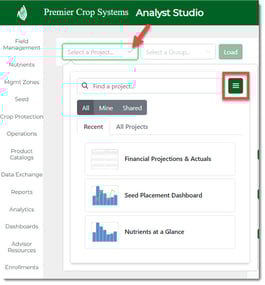
On the Analyst Studio Page, click the "Select a Project..." dropdown and then click the "Actions" button.
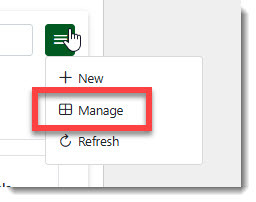
Select the "Manage" option.
You will see 4 options:
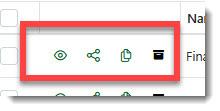
- Open Project
- Share Project
- Clone Project
- Archive Project
To Share a project, click the "Share Project" button.
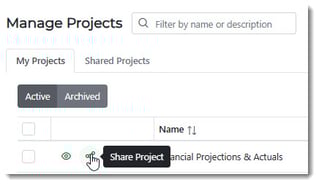
Using the dropdown, select the Customer.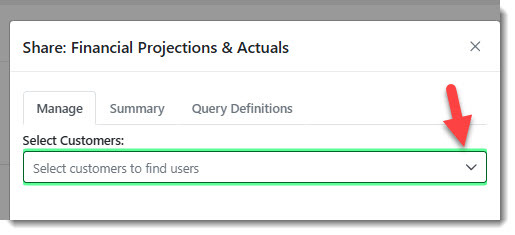
Decide what the shared user(s) will be able to do with the shared project:
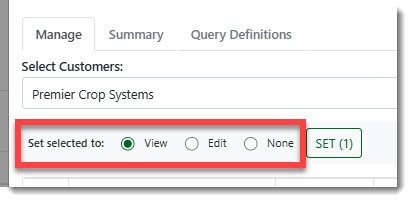
- View - Shared Project will be updated if changes are made by the user sharing.
- Edit - Shared Project can be edited and the edits are shared between the shared user(s).
- None - The Shared Project is shared only.
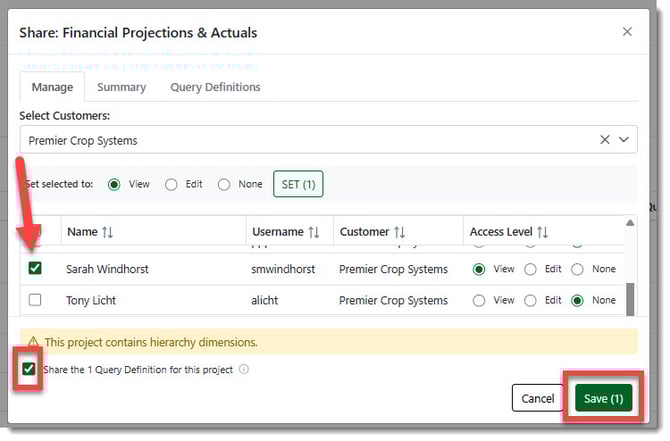
Select the user(s) to share with, select the box to "Share the X Query Definition for this project" and click the "Save(x)" button.
Only Customer Admins can received Shared Projects.
Read this Premier Process to learn about what to do with a Shared Project.