![PCS-Black-icon-1.png]](https://processes.premiercrop.com/hs-fs/hubfs/PCS-Black-icon-1.png?width=35&height=40&name=PCS-Black-icon-1.png)
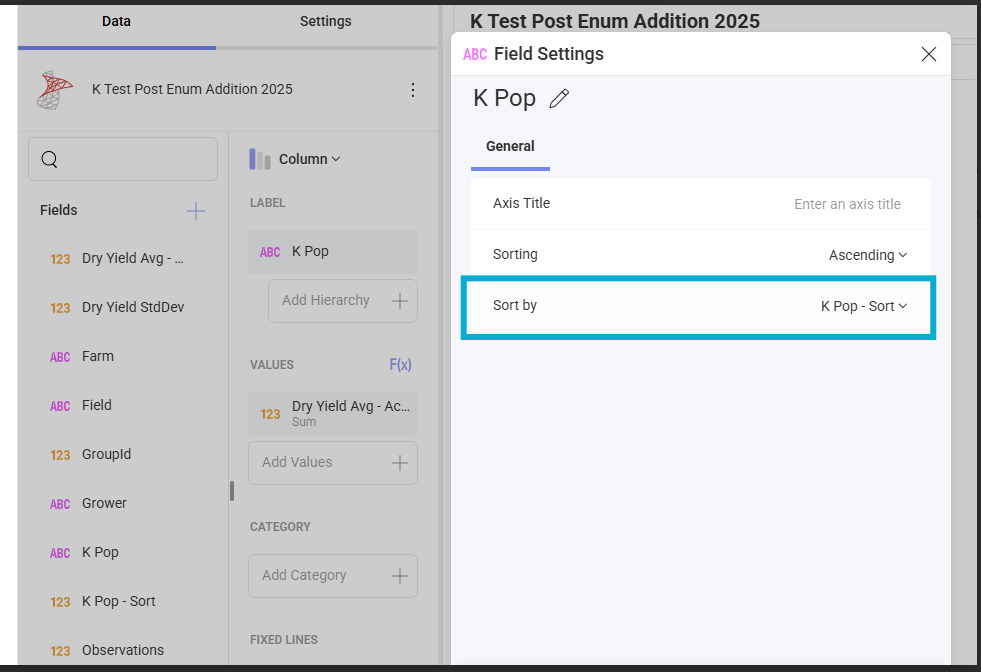
PCS has added a column that can be easily utilized for sorting your data once in a chart, given that sometimes sorting simply by ascending or descending for an attribute that has custom classifications can result with incorrect sort orders. There is a column called “[dimension name] - Sort” automatically added for every dimension in your query that will utilize the order of your classifications as they were set up in the query.
Access this by clicking on the Field once added to your visual, then clicking on Field Settings. Choose to sort ascending or descending but THEN click the 'Sort by' and select your "[dimension name] - sort"