![PCS-Black-icon-1.png]](https://processes.premiercrop.com/hs-fs/hubfs/PCS-Black-icon-1.png?width=35&height=40&name=PCS-Black-icon-1.png)
On the Analyst Studio page, use Select a Project dropdown and you'll see which projects are shared by the shared icon and the permission level (View, Edit, None).
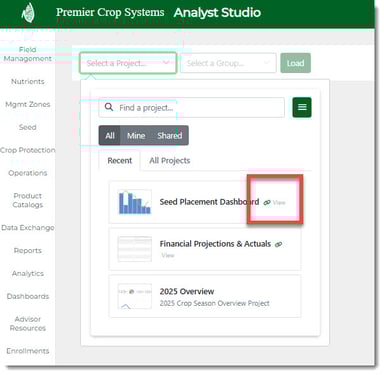
Click on the icon and you will see that when you try to "Select a Group" that there are no groups ready to use.
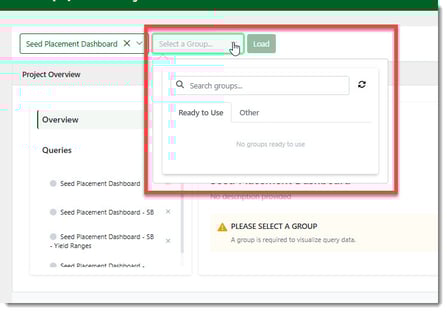
When the Project was shared to you, it shared the Project and the Queries, but it's up to you to run it on your desired group!
On the Manage Queries page, you will see the query(ies) from the shared Project:
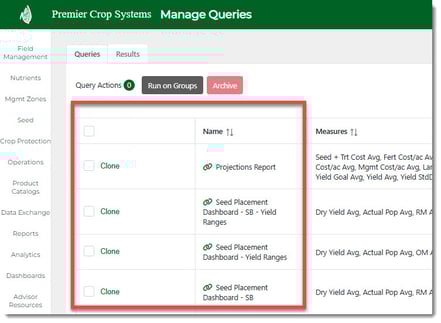
You will now need to run the query(ies) on a desired Group.
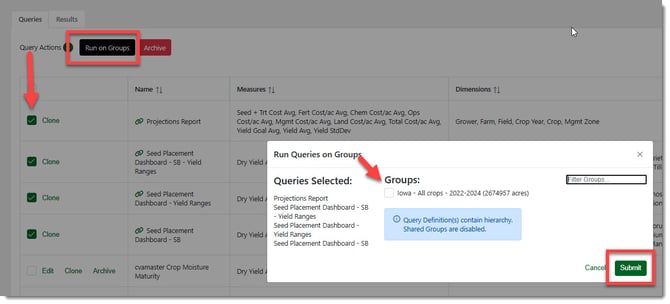
Shared Groups will not be visible in your "Groups" list if Hierarchy was in the Query shared with you.
Once the query(ies) execute, you will now be able to use the Shared Project on your Group!